Introduction
Claim TDS Refund: Many taxpayers notice that Tax Deducted at Source (TDS) has been deducted from their salary, pension, fixed deposit (FD) interest, or other sources of income. If your total taxable income falls below the applicable tax liability, you may be eligible to receive a refund of the excess TDS deducted.
The easiest way to claim this refund is by filing your Income Tax Return (ITR). This guide explains the complete process of filing ITR-1 online and claiming your TDS refund through the Income Tax portal.
Table of Contents
Who Can Claim TDS Refund?
You may be eligible to claim a TDS refund if:
- TDS was deducted from your salary.
- TDS was deducted from pension income.
- TDS was deducted on FD or savings account interest.
- Your overall tax liability is lower than the tax already deducted.
- Your total income falls within the applicable tax rebate and exemption limits.
When you file your Income Tax Return correctly, the Income Tax Department calculates your actual tax liability and refunds any excess tax paid.
Tax-Free Income Limit FY 2025-26: Is It ₹5 Lakh or ₹12 Lakh? Doubt Cleared
Step-by-Step Guide to Claim TDS Refund
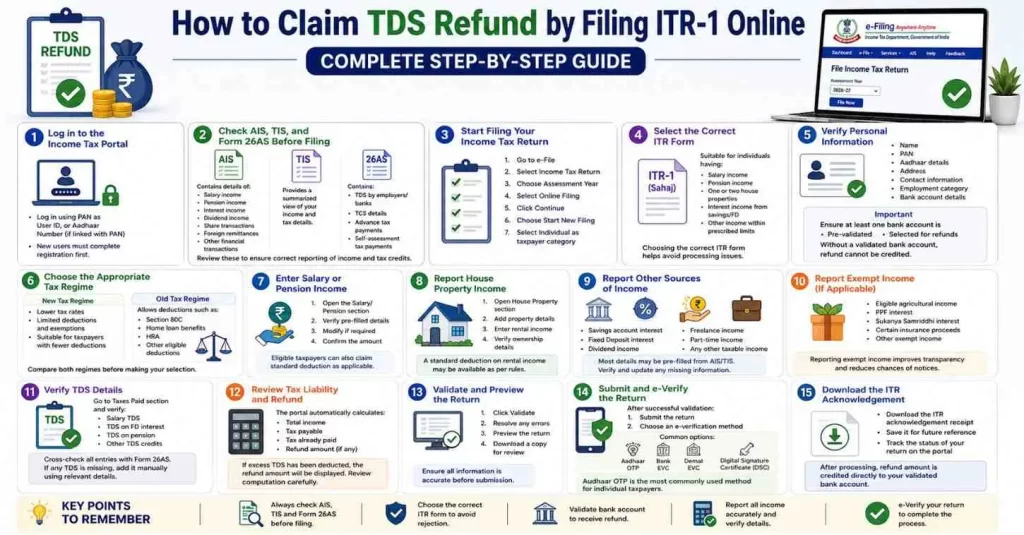
Log in to the Income Tax Portal
Visit the official Income Tax e-Filing portal and log in using:
PAN as User ID, or
Aadhaar Number (if linked with PAN)
If you are a first-time user, complete the registration process before l
Check AIS, TIS, and Form 26AS Before Filing
Before filing your return, verify all income and tax-related information through:
AIS (Annual Information Statement)
AIS contains details of:
Salary income
Pension income
Interest income
Dividend income
Share transactions
Foreign remittances
Other financial transactions
TIS (Taxpayer Information Summary)
TIS provides a summarized view of your income and tax details.
Form 26AS
Form 26AS contains:
TDS deducted by employers or banks
TCS details
Advance tax payments
Self-assessment tax payments
Reviewing these documents helps ensure that all income and tax credits are correctly reported in your return.
Start Filing Your Income Tax Return
After verifying your records:
Go to e-File.
Select Income Tax Return.
Choose the relevant Assessment Year.
Select Online Filing.
Click Continue.
Choose Start New Filing.
Select Individual as the taxpayer category.
Select the Correct ITR Form
ITR-1 (Sahaj) is generally suitable for individuals having:
Salary income
Pension income
Income from one or two house properties
Interest income from savings or fixed deposits
Other income sources within prescribed limits
Choosing the correct ITR form is important to avoid processing issues
Verify Personal Information
Review and confirm:
Name
PAN
Aadhaar details
Address
Contact information
Employment category
Bank account details
Important
Ensure at least one bank account is:
Pre-validated
Selected for receiving refunds
Without a validated bank account, the refund cannot be credited.
Choose the Appropriate Tax Regime
While filing, you will be asked whether you wish to remain under the New Tax Regime or opt for the Old Tax Regime.
New Tax Regime
Lower tax rates
Limited deductions and exemptions
Suitable for taxpayers with fewer deductions
Old Tax Regime
Allows deductions such as: Section 80C
Home loan benefits
HRA
Other eligible deductions
Compare both regimes before making your selection.
Enter Salary or Pension Income
If you receive salary or pension:
Open the Salary/Pension section.
Verify pre-filled details.
Modify information if required.
Confirm the amount.
Eligible taxpayers can also receive the standard deduction available under the applicable tax provisions.
Report House Property Income
If you earn rental income:
Open the House Property section.
Add property details.
Enter rental income received.
Verify ownership details.
Under current tax provisions, a standard deduction on rental income may be available as per applicable rules.
Report Other Sources of Income
Include income such as:
Savings account interest
Fixed Deposit interest
Dividend income
Freelance income
Part-time income
Any other taxable income
Most income details may already appear as pre-filled data based on AIS and TIS records.
Always verify and update any missing information
Report Exempt Income (If Applicable)
You may need to disclose exempt income such as:
Eligible agricultural income
PPF interest
Sukanya Samriddhi interest
Certain insurance proceeds
Other exempt income categories
Reporting exempt income improves transparency and reduces the chance of notices or discrepancies.
- Verify TDS Details
This is the most important step for claiming a refund.
Navigate to the Taxes Paid section and verify:
Salary TDS
TDS on FD interest
TDS on pension
Other TDS credits
Cross-check all entries with Form 26AS.
If any TDS entry is missing, add the details manually using the relevant TDS information available in your records.
Review Tax Liability and Refund
The portal automatically calculates:
Total income
Tax payable
Tax already paid
Refund amount (if any)
If excess TDS has been deducted, the system will display the refund amount you are eligible to receive.
Carefully review the computation before proceeding.
Validate and Preview the Return
Before submission:
Click Validate.
Resolve any errors displayed.
Preview the complete return.
Download a copy for review if needed.
Ensure all information is accurate before submission.
Submit and e-Verify the Return
After successful validation:
Submit the return.
Choose an e-verification method.
Common options include:
Aadhaar OTP
Bank EVC
Demat EVC
Digital Signature Certificate (DSC)
Aadhaar OTP is the most commonly used method for individual taxpayers
Download the ITR Acknowledgement
Once the return is successfully filed and verified:
Download the ITR acknowledgement receipt.
Save it for future reference.
Track the status of your return through the Income Tax portal.
After processing, the refund amount is credited directly to your validated bank account.
Common Mistakes to Avoid
- Filing without checking AIS, TIS, and Form 26AS.
- Selecting the wrong ITR form.
- Forgetting to report interest income.
- Not validating the refund bank account.
- Failing to e-verify the return.
- Ignoring mismatch errors during validation.
Top 5 FAQs on Claiming TDS Refund Through ITR Filing
Yes. If TDS has been deducted from your salary, pension, FD interest, or any other income, but your final tax liability is lower than the tax already deducted, you can claim the excess amount as a refund by filing your Income Tax Return (ITR).
Yes. The Income Tax Department processes TDS refunds only after you file your Income Tax Return. Without filing an ITR, any excess TDS deducted will not be refunded automatically.
Before filing your return, you should verify:
AIS (Annual Information Statement)
TIS (Taxpayer Information Summary)
Form 26AS
Form 16 (for salaried employees)
Bank interest certificates and other income records
These documents help ensure that all income and TDS details are reported correctly
The refund processing time varies depending on the Income Tax Department’s verification and processing schedule. In most cases, refunds are credited to the taxpayer’s validated bank account within a few weeks to a few months after the return is successfully filed and e-verified.
If TDS is missing from Form 26AS:
Contact the deductor (employer, bank, or other payer).
Ensure the deductor has filed the TDS return correctly.
Verify your PAN details.
Wait for the TDS records to be updated if recently deducted.
Do not claim TDS that is not reflected in Form 26AS unless you have valid supporting documentation and the issue has been resolved.
Conclusion: Claim TDS Refund
Claiming a TDS refund is a straightforward process when your Income Tax Return is filed correctly. Before filing, always review AIS, TIS, and Form 26AS to ensure all income and tax deductions are accurately reported. Verify your bank account, review the refund calculation, and complete e-verification to ensure faster processing.
A properly filed return not only helps you claim your refund but also keeps your tax records accurate and compliant with Income Tax regulations.